


TL;DR — A calorie and exercise assistant that runs inside a Telegram chat. You text it what you ate (or send a photo), it logs structured macros plus a short coach reply to Postgres, and tracks your daily and weekly balance. Go backend. The model is the easy part; the engineering is in forcing clean structured data out of fuzzy input, validating it, and pinning every entry to the right day.
What it is
- Text it. Describe a meal and it names the dish and estimates calories + macros (protein, carbs, fats, fiber), saves it, and replies.
- Photo it. Send a plate photo and a vision model does the same extraction.
- Ask it. Questions ("is this too low?") are answered, not logged, so advice never pollutes your totals.
One model call returns one fixed shape: consumptions[], exercises[], coach_response. Everything downstream is built on that contract.
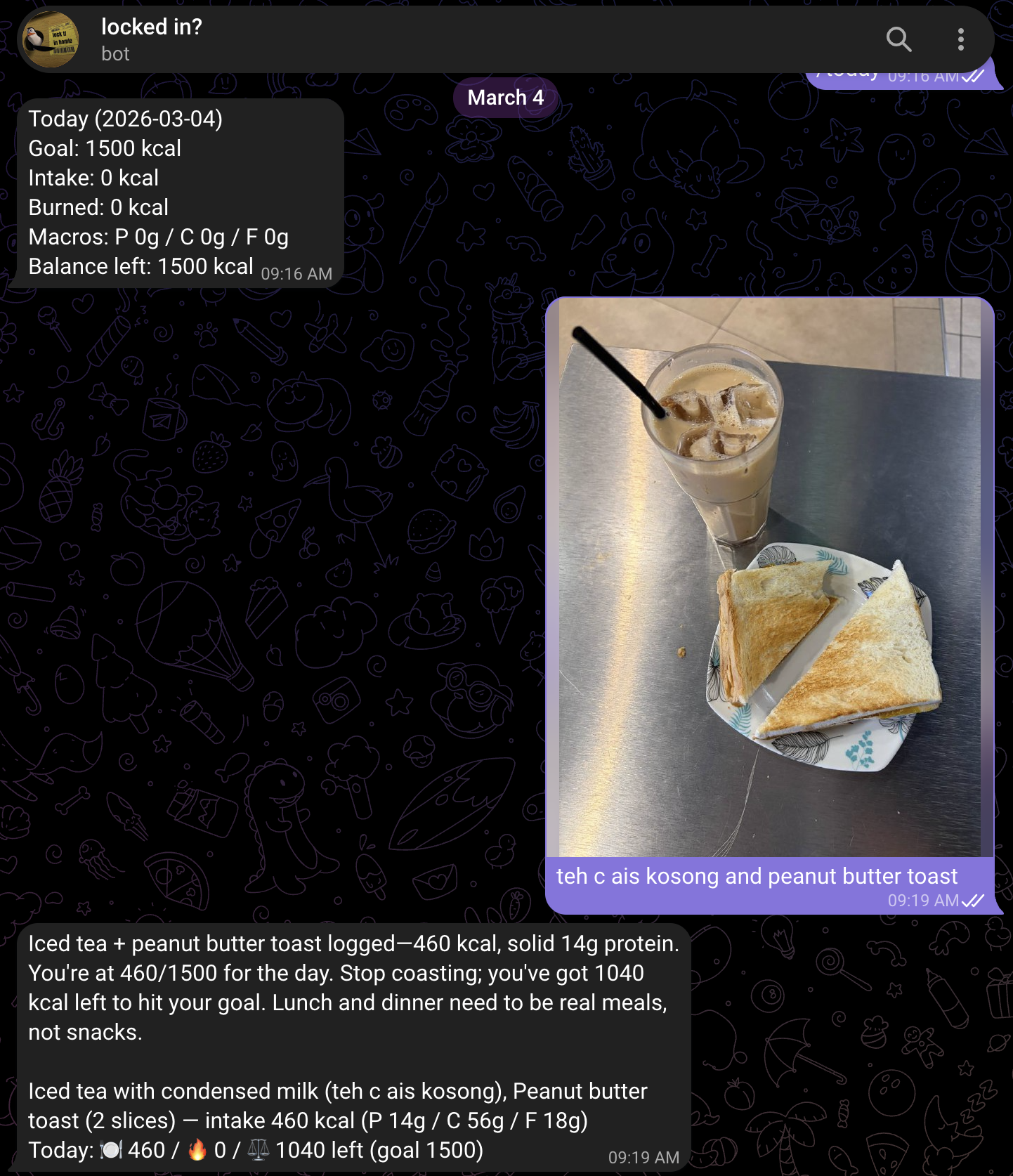
That's the whole loop in one screen: a /today balance up top, a plate photo sent in, and the bot coming back with the named dish, calories, macros, and a short coach nudge — all logged to the right day.
How it works
One message in, one structured log and reply out. The flow:
- Receive the webhook, verify the secret, dedupe the message.
- Assemble context (recent messages, daily/weekly totals, tone) and build the prompt.
- Call the model with text, or text + image.
- Pull a clean JSON object out of the response.
- Validate it.
- Resolve which day the entry belongs to.
- Persist the rows and send the coach reply.
The parts people usually wonder about, "how does that stay correct?":
Forcing the shape
The system prompt pins the model to JSON-only and shows it the schema inline. The load-bearing lines:
Output ONLY valid JSON, no text, explanations, or markdown.
Schema: {"consumptions":[{"name":"","calories":0,"protein_g":0,...}],
         "exercises":[{"activity_type":"","calories_burned":0,...}],
         "coach_response":""}
...
- If ambiguous, ask one concise clarification and keep arrays empty.
- Do NOT log entries when the user asks a question; answer in coach_response, keep arrays empty.
That last rule is what keeps "is 1500 too low?" from being logged as a meal. Context (tone, daily/weekly summaries, recent messages) gets appended underneath so replies are grounded in your actual balance, not generic.
Reading the photo
Images aren't OCR'd or pre-processed. The bytes are downloaded from Telegram, base64-encoded, and attached to the same model call as image blocks alongside the prompt:
blocks := []ContentBlockParamUnion{NewTextBlock(prompt)}
for _, img := range in.ImagePayloads {
    blocks = append(blocks, NewImageBlockBase64("image/jpeg", encodeBase64(img)))
}
So a photo and a text caption flow through one identical path and come back in the same schema. The prompt tells the model to prioritize the image when the caption is thin. If an image was sent but the download failed, that's flagged (ImageRefsPresentButEmpty) so the bot says so instead of silently logging nothing.
Getting clean JSON out
The model is told to return pure JSON; the parser assumes it won't. It strips markdown fences, then runs a brace-matching scanner that tracks depth, in-string state, and escapes:
text = sanitizeJSONEnvelope(text)   // strip ```json fences
obj  = extractJSONObject(text)      // brace matcher, not a regex
res  = parseLLMJSON(obj)            // unmarshal into the typed result
A regex or "first { to last }" breaks the moment coach_response contains a }. The scanner doesn't, and it has a table of unit tests for the odd shapes the model has produced.
Validating before anything is saved
Parsing successfully isn't the same as the data being usable, so there's a validation layer. Onboarding is the clearest example, the parsed result carries its own verdict:
{ "missing_fields": ["weight_kg"], "errors": [], "is_valid": false }
If it isn't valid, the user is asked for the missing piece instead of a half-record being written. Food entries get the same treatment in spirit: structural checks on the parsed object, unknown fields absorbed into an others JSONB column so a surprise key never breaks ingestion, and approximate values requested in the prompt rather than nulls. If validation or parsing fails entirely, a deterministic keyword fallback takes over, so the worst case is a rougher estimate, never a dead bot.
The right day
Every entry stores two timestamps: tracked_at (when the message arrived) and entry_date (the day it counts toward). They're split on purpose:
- "yesterday" and weekday names rewind
entry_date. - A message between 2 and 4am counts toward the previous day.
- Everything resolves in the user's timezone.
So a 3am supper lands on last night's total without losing the real timestamp.
No double-logging
Telegram retries webhook deliveries. Messages are deduped so a retry is a no-op:
UNIQUE (chat_id, message_id)
-- writes use ON CONFLICT (chat_id, message_id) DO UPDATE
Setup
1. Prerequisites: Go 1.24+, Docker (for local Postgres).
2. Keys: Telegram bot token from @BotFather; Anthropic API key (optional, fallback runs without it).
3. Env:
cp env.example .env
TELEGRAM_BOT_TOKEN=...        # from BotFather
ANTHROPIC_API_KEY=...         # optional
TELEGRAM_WEBHOOK_SECRET=...   # recommended, verifies calls are from Telegram
REGISTER_CODE=...             # gates sign-up
4. Run locally:
docker compose up -d postgres   # start DB
go run .                        # migrations auto-run on boot
Comes up on localhost:8220; /health and /ready should return 200.
5. Webhook (the one step with rules): URL must be HTTPS, only ports 443/80/88/8443, and webhook and polling can't both be on. Set WEBHOOK_URL=https://your-domain.com/webhook and it self-registers on startup, or do it once by hand:
curl -X POST "https://api.telegram.org/bot${TELEGRAM_BOT_TOKEN}/setWebhook" \
  -d '{"url":"https://your-domain.com/webhook","secret_token":"<your-secret>","drop_pending_updates":true}'
6. Deploy: provision Postgres and set DATABASE_URL, deploy the container with env in your secret manager, expose HTTPS, set WEBHOOK_URL, restart once. Migrations run on startup, so there's no separate DB step.
Note: written with the help of an llm from my project + own points, dont mind the llm-ish words :>